Microworkers alternatives
Microworkers alternative: Microworker vs Microworkers compared
Considering a Microworkers alternative? Compare campaign fees, how proof is reviewed and how workers get paid on Microworker.app before you move a job.
Microworker.app and Microworkers.com are separate, unaffiliated services.
Key takeaways
The short answer: Consider Microworker for a fixed-reward pilot. An established Microworkers Hire Group or API workflow may be a good reason to stay where you are.
- One brief, many positions. Set the reward and the number of people you need, and fund the budget before work starts.
- A different review process. Microworker’s automated review decides most proofs in seconds. Microworkers employers rate each task or request a revision.
- Workers keep the whole reward. Microworkers deducts a 10% service charge from each Satisfied task. Microworker takes nothing from worker earnings.
Microworkers vs Microworker at a glance
| For employers | Microworker Fixed-reward task marketplace | Microworkers As published |
|---|---|---|
| Standard employer fee | Microworker5% of the reward budget + $1 per job. One job can have many worker positions. | MicroworkersBasic: 7.5% of rewards for tasks rated Satisfied + a $0.75 campaign approval fee. [1] |
| Screenshot or file proof | MicroworkerNo proof surcharge. Tasks that ask for a screenshot start at $0.05 per worker. | MicroworkersAn additional $0.01 per task. [1] |
| Other fee models | MicroworkerVerified ($50 per 30 days) waives the platform fee. Count the plan in your total. | MicroworkersHire Group: no approval fee; 10% for tasks of $0.10 or more, otherwise $0.01 per task. [1] |
| Campaign size | MicroworkerAny number of positions, from $0.02 per worker and $1 per job. | MicroworkersBasic: at least 30 positions. Hire Group: 1 or more. [1] |
| How work is checked | MicroworkerAutomated review decides most proofs within seconds: paid, sent back for a fix, or not accepted. The few it is unsure about are decided by our team within a day. | MicroworkersEmployers rate tasks Satisfied or Not Satisfied, or request a revision. Not Satisfied tasks are not charged. [1] |
| Funding | MicroworkerCrypto deposits (USDT and other coins) from $20. | MicroworkersCredit card, Skrill or Dwolla (US only); $10 minimum, no deposit fee. [2] |
| API | MicroworkerPublic REST API with keys, webhooks and an OpenAPI file. | MicroworkersAPI 2.0 for Basic and Hire Group campaigns. [3] |
What a job costs: Microworker vs Microworkers
Compare the same reward budget, with every position successfully completed. Change the numbers to match your job.
| Platform | Rewards | Fees | Total |
|---|---|---|---|
| Microworker 5% + $1 per job | Rewards$50.00 | Fees$3.50 | Total$53.50 |
| Microworkers Basic campaign | Rewards$50.00 | Fees$4.50 | Total$54.50 |
What the example includes
Standard USD fees only. Payment processing, taxes, refunds and promotions are excluded, and per-task rounding can differ at checkout.
Microworker’s minimum wallet funding is $20, separate from the job cost. Verified costs $50 per 30 days and currently waives the platform fee; include it if you choose it.
Basic requires 30 or more positions. Hire Group uses a separate schedule: no approval fee, 10% for rewards of $0.10 or more, otherwise $0.01 per assignment; proof fees may apply.
Fees from Microworkers guidelines and our current fee configuration.
Here to earn? How payouts compare
For workers, the difference is mostly in what each platform keeps and how you can be paid.
| For workers | Microworker Paid in USDT or USDC | Microworkers As published |
|---|---|---|
| Fee on earnings | Microworker0% — workers receive the full reward shown on the task. | MicroworkersA 10% service charge is deducted from each Satisfied task. [2] |
| Minimum withdrawal | Microworker$5 | Microworkers$9 (Airtm, PayPal, Skrill, Onto), $10 (Transpay), $20 (Payoneer). [1] |
| Payout methods | MicroworkerUSDT on BNB Smart Chain (BEP20), Arbitrum and Polygon; USDC on BNB Smart Chain (BEP20). | MicroworkersAirtm, PayPal, Skrill, Payoneer, Transpay and Onto. [1] |
| When payouts go out | MicroworkerRequest a withdrawal once your earned balance reaches $5; earnings can be cashed out 3 days after they are paid, and requests are checked, then sent to your wallet. | MicroworkersTwice a week, on Wednesdays and Sundays, once identity (KYC) is verified. [2] |
Good to know before you join: Microworker’s daily balance rule can move part of an earned balance after notice on consecutive inactive UTC days — 0.5%, then 1%, then 2% — to that day’s active workers. Deposits, money still under review and payouts are never touched, and a day counts only when at least 5 new tasks you could do were posted.
What to check before you move
Basic and Hire Group are different comparisons
The calculator uses Microworkers Basic. If you already work with a chosen group of workers, compare the Hire Group schedule and the cost of moving that workflow separately — do not apply the Basic approval fee to Hire Group.
Move the brief before moving the budget
Copy your own task instructions, examples of acceptable proof and country or device requirements. Do not transfer workers’ personal data without permission. Start with one job and check the work before migrating a larger campaign.
- Use measurable completion requirements.
- Choose proof that demonstrates the work.
- Check that automated review suits the task.
- Compare the final funding screen before paying.
Keep integration costs in the decision
Both platforms document APIs. If your system already creates campaigns and reads results through Microworkers, test authentication, task fields, results and retries on Microworker before replacing that integration.
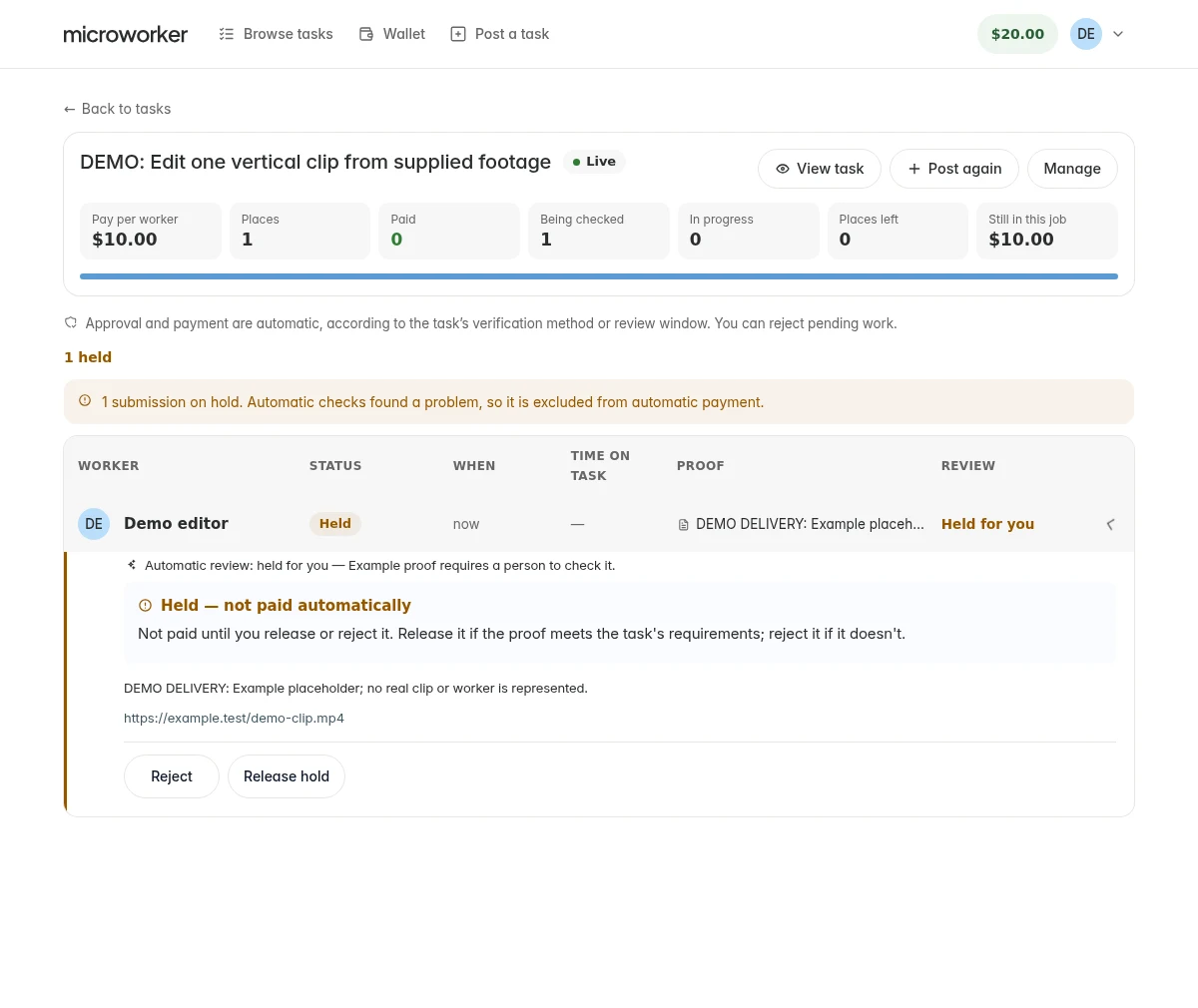
Inside Microworker: from your brief to submitted proof
The same task workspace holds the instructions, the rewards and the results.
- Make the task clear. Add instructions, positions and the proof you need.
- Review the budget. Check the reward and fees before funding the job.
- Follow the result. Automated checks decide submissions, and our team takes a closer look at the few they are unsure about.
Microworker or Microworkers: which fits your work?
Consider Microworker
You want to test a fixed-reward job with objective proof, can work with automated review, and your workers prefer USDT or USDC.
Consider staying with Microworkers
You depend on its Hire Groups, manual task rating or an integration that already works well.
Frequently asked questions
Is Microworker always cheaper than Microworkers?
No. It changes with campaign size, reward, campaign type, proof surcharge and subscriptions. At 100 positions paying $0.50, our standard total is $53.50 and Microworkers Basic is $54.50, before its optional proof surcharge and other excluded costs.
Do Microworkers workers pay a fee?
Its FAQ says a 10% service charge is deducted from each Satisfied task. Microworker takes no fee from worker earnings; withdrawals start at $5 and cost nothing, as Microworker pays the network fee.
Can I move my existing campaign automatically?
There is no one-click import. Recreate and test the brief and proof first.
Should I search for microworker or microworkers?
The singular and plural lead to different services. This site is Microworker.app; the other platform is Microworkers.com.
Still working through a requirement? Talk to us.
Sources and methodology
Written by Microworker from each platform’s public documentation and our current configuration. We have not bought competitor campaigns or measured comparative speed, quality or payout reliability. Competitor names belong to their owners; no affiliation is implied.
- Microworkers guidelines — Basic and Hire Group fees, proof surcharges, rating rules and payout minimums by method.
- Microworkers FAQ — Worker service charge, payment days, KYC and employer deposit methods.
- Microworkers API 2.0 — Campaign and task integration documentation.
- Microworker platform configuration — Our fees, plan prices, minimums, payout currencies and network fee estimates — what this page reads.
- Microworker terms — Task rules, withdrawals and the daily balance rule.
- Microworker API documentation — Supported integrations and webhooks.
Prices and availability change. Confirm current terms before funding or withdrawing.