SproutGigs & Picoworkers alternatives
SproutGigs alternative (formerly Picoworkers): Microworker compared
Looking for a SproutGigs alternative — or still searching for Picoworkers, its former name? See how Microworker compares for repeated microjobs, from the brief to the payout.
Key takeaways
The short answer: Microworker may fit a simple job with a fixed reward and objective proof. SproutGigs has several job types with different fees, so compare the one you actually use.
- Match the job type. The calculator uses SproutGigs Classic Jobs. Express, List and Power Jobs have their own fee schedules.
- Keep the difference in perspective. On $50 of rewards the standard examples come to $53.50 here and $54.15 there. Workflow fit matters too.
- Coming from Picoworkers? SproutGigs describes itself as formerly Picoworkers. This guide compares the current service.
SproutGigs vs Microworker at a glance
| For employers | Microworker Fixed-reward task marketplace | SproutGigs As published |
|---|---|---|
| Standard posting fee | Microworker5% of the reward budget + $1 per job. One job can have many worker positions. | SproutGigsClassic Jobs: 7% per task rated Satisfied + a $0.65 approval fee. [1] |
| Other fee models | MicroworkerVerified ($50 per 30 days) waives the platform fee. Count the plan in your total. | SproutGigsExpress: 10% + $1.00. List: 10% (minimum $0.01) + $0.35. Power Jobs (tasks over $2): 2.5% for the buyer. Task bonuses: 3.5%. [1] |
| How work is checked | MicroworkerAutomated review decides most proofs within seconds: paid, sent back for a fix, or not accepted. The few it is unsure about are decided by our team within a day. | SproutGigsEmployers rate submissions. Time to rate defaults to 7 days (up to 90), with optional automatic verification and rating. [2] |
| Targeting | MicroworkerCountries, devices, and worker skills and languages — including language-tested workers. | SproutGigsRegional zones with country exclusions, plus worker level, device and gender options. [2] |
| Funding | MicroworkerCrypto deposits (USDT and other coins) from $20. | SproutGigsCredit card, cryptocurrency, Uphold or Airtm; no deposit fee. [4] |
| API | MicroworkerPublic REST API with keys, webhooks and an OpenAPI file. | SproutGigsPublic API for jobs, task rating and worker lists. [2] |
What a job costs: Microworker vs SproutGigs
Compare the same reward budget, with every position successfully completed. Change the numbers to match your job.
| Platform | Rewards | Fees | Total |
|---|---|---|---|
| Microworker 5% + $1 per job | Rewards$50.00 | Fees$3.50 | Total$53.50 |
| SproutGigs Classic Jobs | Rewards$50.00 | Fees$4.15 | Total$54.15 |
What the example includes
Standard USD fees only. Payment processing, taxes, refunds and promotions are excluded, and per-task rounding can differ at checkout.
Microworker’s minimum wallet funding is $20, separate from the job cost. Verified costs $50 per 30 days and currently waives the platform fee; include it if you choose it.
Other SproutGigs job types (Express 10% + $1, List 10% + $0.35, Power 2.5% buyer / 15% freelancer) are excluded from this Classic example.
Fees from SproutGigs pricing and our current fee configuration.
Here to earn? How payouts compare
If you do tasks on SproutGigs today, these are the differences that change what reaches your wallet.
| For workers | Microworker Paid in USDT or USDC | SproutGigs As published |
|---|---|---|
| Fee on earnings | Microworker0% — workers receive the full reward shown on the task. | SproutGigsPower Jobs (tasks over $2) take 15% from the freelancer. Its pricing lists no freelancer fee on other job types. [1] |
| Minimum withdrawal | Microworker$5 | SproutGigsShown on its withdraw page after sign-in; not on the public pricing page. [1] |
| Payout methods | MicroworkerUSDT on BNB Smart Chain (BEP20), Arbitrum and Polygon; USDC on BNB Smart Chain (BEP20). | SproutGigsShown on its withdraw page after sign-in. [1] |
| Withdrawal fees | MicroworkerNo withdrawal fee: Microworker pays the blockchain network fee. | SproutGigsIts pricing page says withdrawal fees “are variable”. [1] |
| When a task pays | MicroworkerWhen automated review approves it — most proofs are decided within seconds. | SproutGigsWhen the employer rates it Satisfied, or automatically if the employer chose auto-rating. [2] |
Good to know before you join: Microworker’s daily balance rule can move part of an earned balance after notice on consecutive inactive UTC days — 0.5%, then 1%, then 2% — to that day’s active workers. Deposits, money still under review and payouts are never touched, and a day counts only when at least 5 new tasks you could do were posted.
What to check before you move
Looking for a Picoworkers alternative?
SproutGigs identifies its earlier name as Picoworkers, so that search belongs on this page rather than a duplicate one. Microworker.app is a separate service, unrelated to either.
A small percentage difference can be a small dollar difference
For 100 positions at $0.50, the standard examples come to $53.50 on Microworker and $54.15 for SproutGigs Classic. Payment costs, subscriptions and the workflow itself can matter more than that gap.
Test the proof format first
A task that needs text feedback is different from one that needs a screenshot or a finished file. Bring an example of acceptable proof, write clear rejection criteria and run a small pilot. On Microworker, tasks that ask for a screenshot start at $0.05 per worker.
Inside Microworker: from your brief to submitted proof
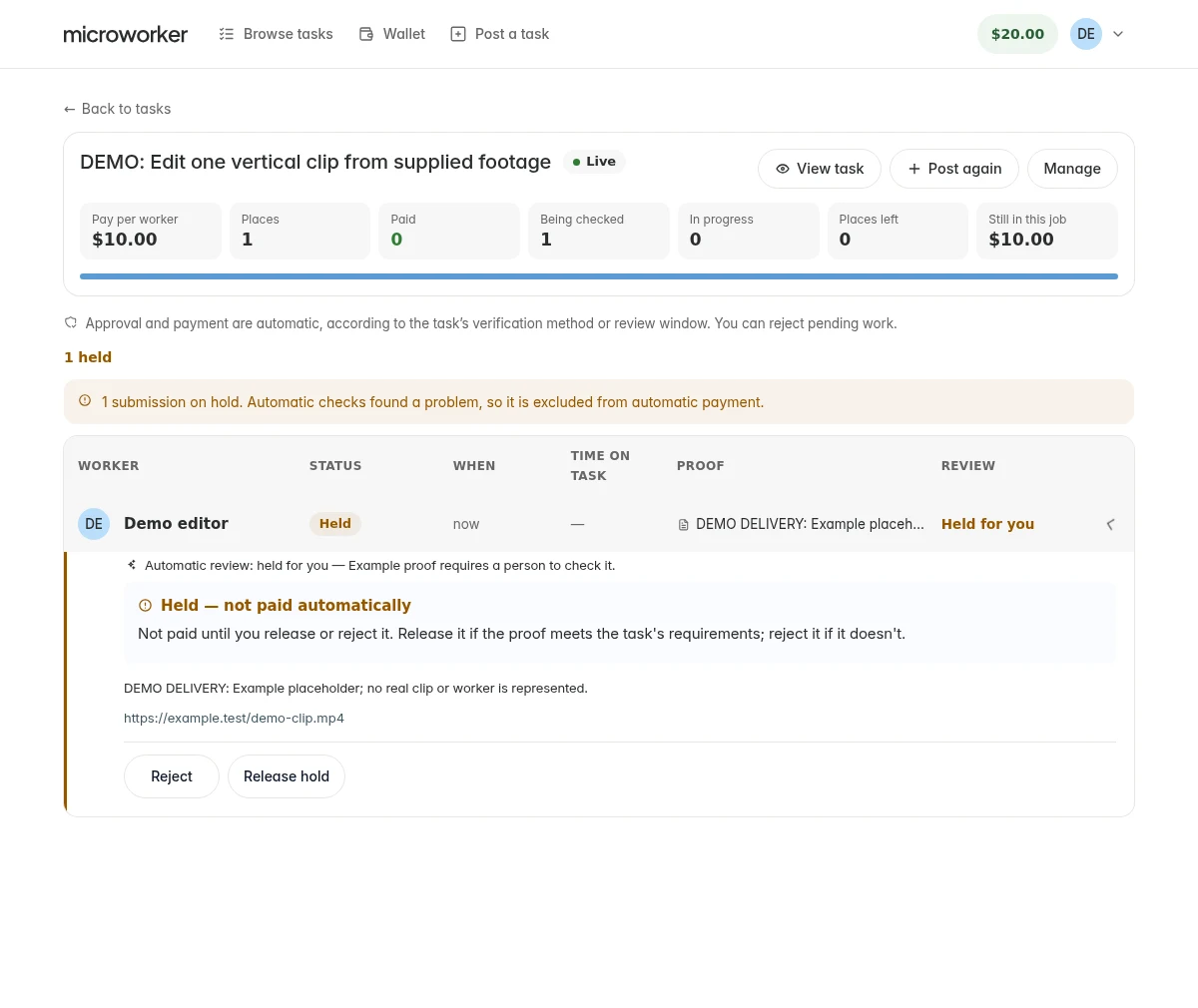
The same task workspace holds the instructions, the rewards and the results.
- Make the task clear. Add instructions, positions and the proof you need.
- Review the budget. Check the reward and fees before funding the job.
- Follow the result. Automated checks decide submissions, and our team takes a closer look at the few they are unsure about.
Microworker or SproutGigs: which fits your work?
Consider Microworker
You run repeated, clearly specified tasks and want a fixed per-job fee, automated proof review and USDT/USDC payouts for your workers.
Consider staying with SproutGigs
You rely on one of its specific job models, its worker lists or its gigs. This comparison does not show equivalent support for those.
Frequently asked questions
Is this also a Picoworkers comparison?
Yes. SproutGigs describes itself as formerly Picoworkers, and this guide compares its current pricing and product.
Does the Classic calculation apply to Express or Power Jobs?
No. Each has its own published schedule. The calculator is limited to Classic Jobs so the assumptions stay visible.
Do SproutGigs workers pay a fee?
SproutGigs’ pricing lists a 15% freelancer fee on Power Jobs (tasks over $2) and says withdrawal fees vary. Microworker takes no fee from worker earnings; withdrawals start at $5 and cost nothing, as Microworker pays the network fee.
Can Microworker replace every SproutGigs gig?
No such claim is made. Repeated small tasks fit this guide; creative projects, specialist services and open-ended revisions need their own assessment.
Still working through a requirement? Talk to us.
Sources and methodology
Written by Microworker from each platform’s public documentation and our current configuration. We have not bought competitor campaigns or measured comparative speed, quality or payout reliability. Competitor names belong to their owners; no affiliation is implied.
- SproutGigs pricing — Classic, Express, List and Power fees; task bonuses; deposits; “withdraw fees are variable”.
- SproutGigs API documentation — Job targeting, time to rate (default 7 days, 1–90), automatic rating, lists and integration.
- SproutGigs on its former name — Identifies the service as formerly Picoworkers.
- SproutGigs terms of use — Funding methods for the Spendable wallet.
- Microworker platform configuration — Our fees, plan prices, minimums, payout currencies and network fee estimates — what this page reads.
- Microworker terms — Task rules, withdrawals and the daily balance rule.
- Microworker API documentation — Supported integrations and webhooks.
Prices and availability change. Confirm current terms before funding or withdrawing.