Whop Content Rewards alternatives
Pay for a clip. Or reward its reach.
Whop Content Rewards ties rewards to the views creators generate. Microworker pays a fixed reward for a completed task. That difference matters more than any headline fee when you choose a clipping workflow.
Sources checked 11 October 2026 · View sources
The differences that matter.
Consider Microworker for a tightly defined clip deliverable. Use a distribution product when verified view-based rewards are central to the campaign.
Two different outcomes
Production and distribution need different budgets.
Microworker and Whop Content Rewards
What earns a reward
Microworker A task submission that passes review, at the fixed reward you set per position.
Whop Content Rewards Approved content earns the campaign’s rate per 1,000 views. [1]
Where the content goes
Microworker A brief can ask for a delivery link. Social posting and audience reach are not part of this workflow.
Whop Content Rewards Creators publish clips or original content on their own social accounts. [1]
Campaign controls
Microworker Instructions, proof requirements, positions and a fixed reward budget.
Whop Content Rewards Budget, rate per 1,000 views, minimum and maximum payout per video, and an optional flat bonus. [1]
Review
Microworker Automated review decides most proofs within seconds: paid, sent back for a fix, not accepted, or held for you to release or reject.
Whop Content Rewards You approve submissions that follow your requirements and reject those that don’t. [1]
Cost
Microworker 5% of the reward budget + $1 per job. One job can have many worker positions.
Whop Content Rewards The documentation explains reward calculations but does not publish a platform fee; it says Whop won’t charge until you set up payments and deposit funds. [1]
Published documentation + our current configuration · Sources & methodology
Start with the outcome.
These are illustrations of each model, not a savings comparison.
This compares Content Rewards only. Microworker is not a replacement for Whop’s memberships, communities or commerce platform.
Here to make clips? What you’re paid for.
A fixed-reward task pays for an accepted deliverable. A view-based campaign pays for the reach of content you post yourself.
Paid for
Microworker An accepted task, at the reward shown before you start.
Whop Content Rewards Verified views on content you post, at the campaign’s rate per 1,000 views. [1]
Limits
Microworker One reward per accepted position.
Whop Content Rewards Each campaign sets a minimum and a maximum payout per video, and may add a flat bonus. [1]
Where your work goes
Microworker To the employer, for example as a delivery link.
Whop Content Rewards On your own social accounts. [1]
Payout
Microworker USDT on BNB Smart Chain (BEP20); USDC on BNB Smart Chain (BEP20). From $5.
Whop Content Rewards Not covered in the Content Rewards documentation. [1]
Good to know before you join: Microworker’s daily balance rule can move part of an earned balance after notice on consecutive inactive UTC days — 0.5%, then 1%, then 2% — to that day’s active workers. Deposits, money still under review and payouts are never touched, and a day with no task available to you does not count.
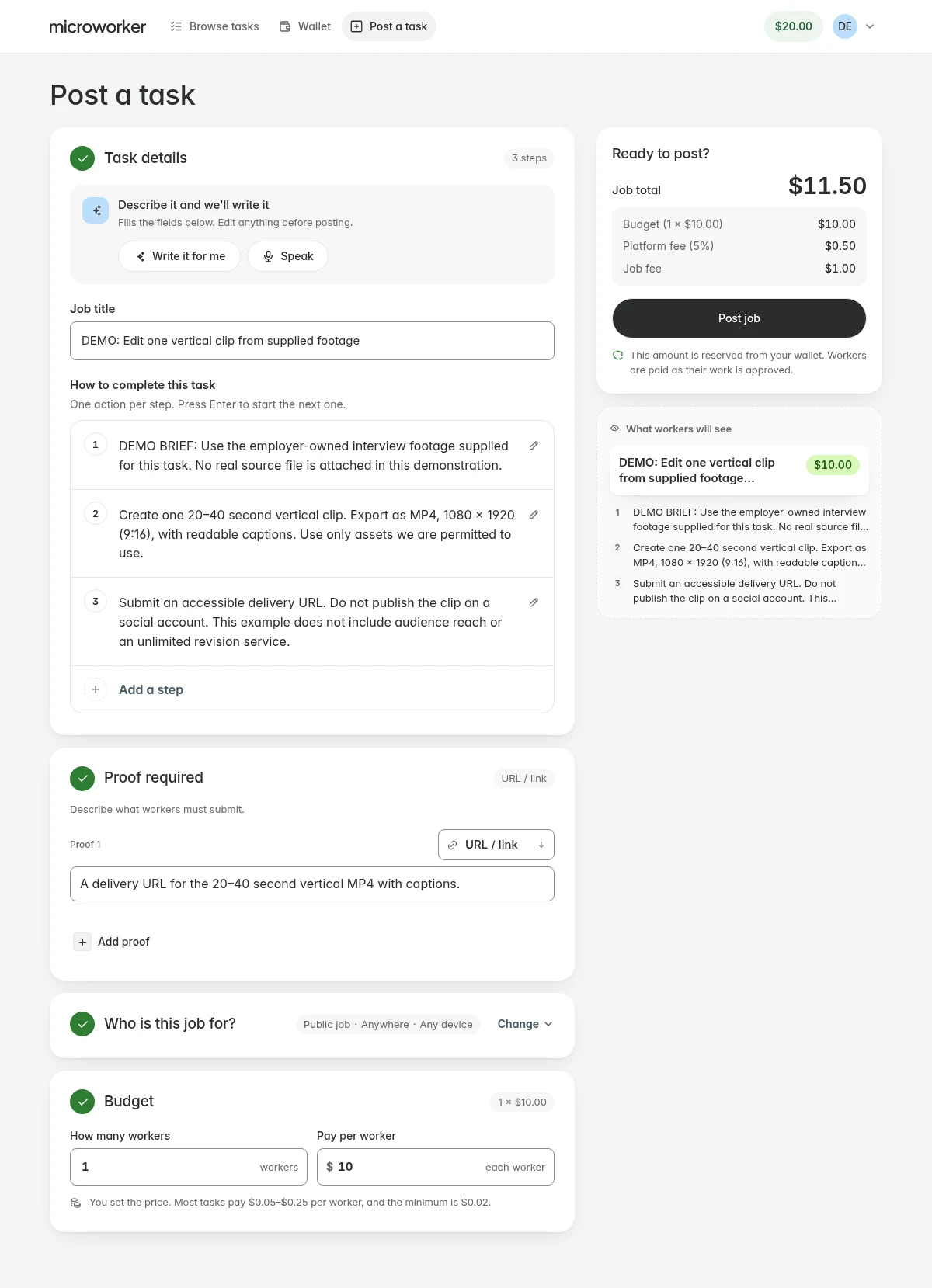
From your brief to submitted proof.
The same task workspace for instructions, rewards and results.
- Make the task clearAdd instructions, positions and the proof you need.
- Review the budgetCheck the reward and fees before funding the job.
- Follow the resultAutomated checks decide submissions or hold proof for your decision.
What to check before you move.
Two budgets that buy different things
Illustration only: 10 task positions at $5 make a $50 reward budget and a $53.50 standard Microworker total. Whop’s documented model at $3 per 1,000 views would pay $6 in creator rewards for 2,000 qualifying views, before any bonus. Those are different outcomes, not a savings comparison.
Where the fixed-task approach stops
Microworker is not a replacement for Whop’s memberships, checkout or communities. The clipping task shown here also does not provide creator discovery, view-fraud detection, attribution or performance guarantees.
Match the review to the creative risk
Objective requirements such as duration, aspect ratio and delivery format make a brief clearer. They don’t prove that automated review can judge taste, brand fit or music rights. If payment must wait for your manual creative approval, discuss it before funding.
Choose what fits your work.
A few good questions.
Can Microworker pay clippers per 1,000 views?
No. The workflow shown here uses a fixed reward for each task position. Don’t choose it as a replacement for view-based billing.
Is this a comparison with all of Whop?
No. It is about Content Rewards specifically, and the alternative of buying a fixed clip deliverable.
Does a completed clip include posting or guaranteed reach?
No. The example asks for a delivery link to a video file. Publishing, usage rights and distribution must be agreed separately, and no views are promised.
Still working through a requirement? Talk to us
A clear brief. A place to start.
Prepare one task and see whether the workflow fits your work.
Start with a taskSources & methodology
Written by Microworker from each platform’s public documentation and our current configuration. We have not bought competitor campaigns or measured comparative speed, quality or payout reliability. Competitor names belong to their owners; no affiliation is implied.
- Whop Content Rewards documentationClips and original content, rate per 1,000 views, budget controls, bonuses and review.
- Microworker platform configurationOur fees, plan prices, minimums, payout currencies and network fee estimates — what this page reads.
- Microworker termsTask rules, withdrawals and the daily balance rule.
- Microworker API documentationSupported integrations and webhooks.
Prices and availability change. Confirm current terms before funding or withdrawing.