Video clipping with Microworker
Long-form in. A clear clip brief out.
Supply footage you have permission to use, define one clear clip and set a reward. This guide shows how to prepare the task, and where you still need separate creative review or distribution.
Sources checked 11 October 2026 · View sources
Make the deliverable clear.
Start with one bounded pilot. The screenshots show the real task interface with example data; they are not a completed paid clipping campaign.
One brief, one defined output
Example deliverable · illustrated, not a finished campaign
A better brief starts here.
Choose a starting point. Add your source, deadline, reward and usage terms before posting.
Turn one interview moment into a vertical clip
Use the supplied employer-owned interview footage. Select one self-contained answer from the specified segment.
- Format
- One 20–40 second vertical MP4 · 1080 × 1920 · 9:16 · readable captions
- Assets
- Only music and footage we have permission to use.
- Delivery
- An accessible delivery URL. No social posting included.
Confirm source access, intended usage and required rights. Replace the example details before posting.
Here to edit clips? How it works for you.
Clipping tasks pay a fixed reward for an accepted deliverable — not for views.
Good to know before you join: Microworker’s daily balance rule can move part of an earned balance after notice on consecutive inactive UTC days — 0.5%, then 1%, then 2% — to that day’s active workers. Deposits, money still under review and payouts are never touched, and a day with no task available to you does not count.
From your brief to submitted proof.
The same task workspace for instructions, rewards and results.
- Make the task clearAdd instructions, positions and the proof you need.
- Review the budgetCheck the reward and fees before funding the job.
- Follow the resultAutomated checks decide submissions or hold proof for your decision.
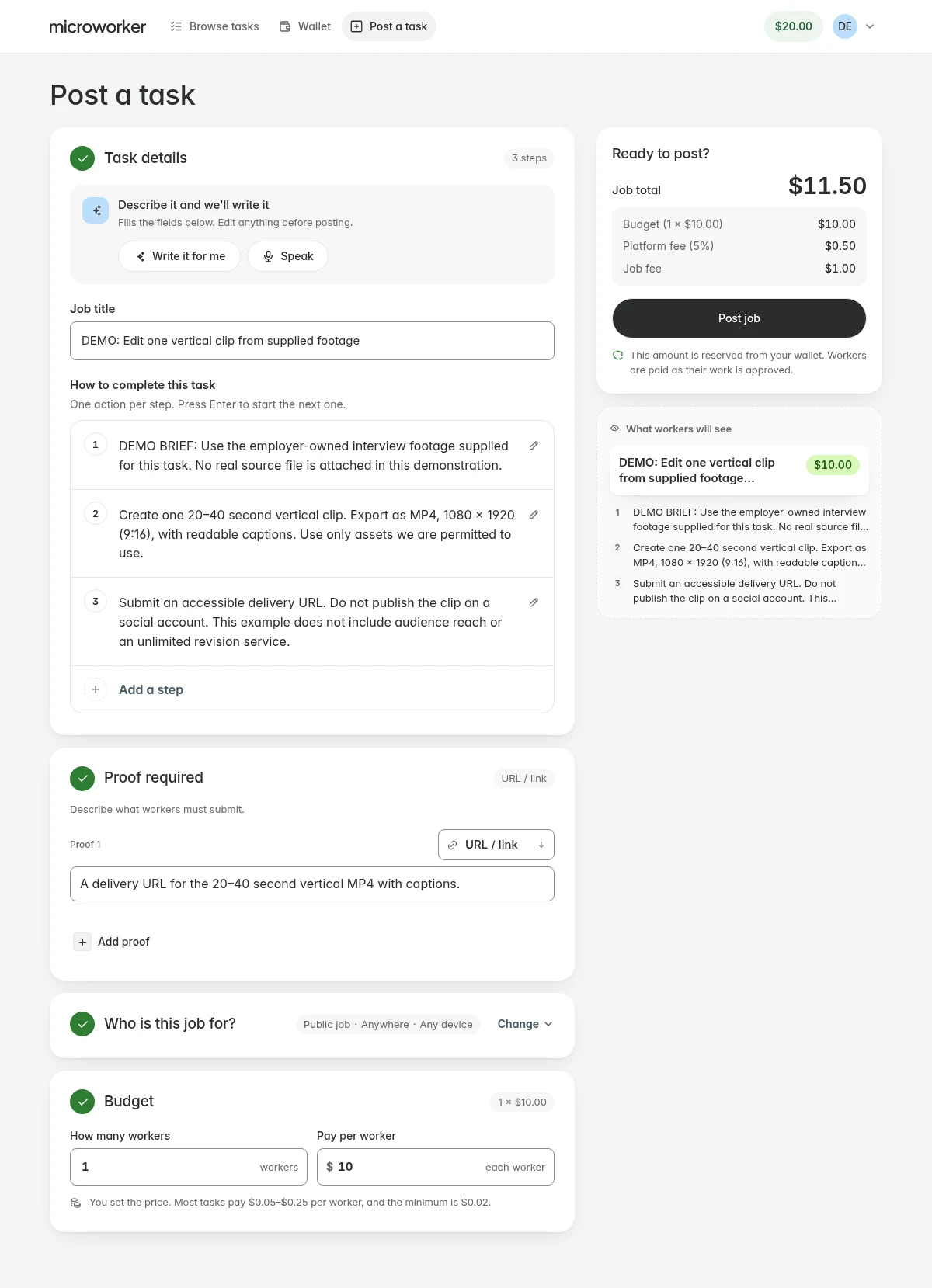
Planning the task.
Write the brief around one output
Example: use employer-owned interview footage to deliver one 20–40 second vertical MP4. Specify the source segment, 9:16 aspect ratio, 1080 × 1920 export, readable captions and an accessible delivery link. Ask only for the work the reward reasonably covers.
Make rights and delivery explicit
State that you can authorise editing the source footage. Define the intended use, any rights you need from the editor, allowed music or assets, and whether project files are required. The example does not ask for social posting or access to anyone’s account.
Decide how quality will be checked
Microworker applies automated proof review and can hold uncertain submissions for you. It does not provide a manual brand-approval checkpoint for every clip, and a delivery link alone is not proof of suitable quality. For subjective approvals, discuss your workflow before funding.
Set a budget, then validate the pilot
An illustrative one-position task with a $10 reward costs $11.50 under the standard 5% + $1 schedule, before payment costs. The $20 wallet minimum is separate: unused funding stays in your wallet and is not a task fee.
- Check that the source and delivery links work.
- Inspect the export, captions and requested rights.
- Record the actual time, cost and whether the result is usable.
- Add positions only once the process fits your needs.
Choose what fits your work.
A few good questions.
Is Microworker a video editor?
No. Workers use their own editing tools; Microworker provides the task, proof and reward workflow shown in this guide.
Are the screenshots proof of a successful clipping campaign?
No. They show the current interface filled with labelled example data. No real workers, funded campaign or measured outcome are shown.
Can I require unlimited revisions?
This is not an unlimited revision service. Define the deliverable and check that automated review suits it before posting.
Can workers upload the final video directly?
The workflow shown asks for a delivery link. It does not provide native large-video delivery or collaborative editing.
Still working through a requirement? Talk to us
A clear brief. A place to start.
Prepare one task and see whether the workflow fits your work.
Start with a taskSources & methodology
Written by Microworker from each platform’s public documentation and our current configuration. We have not bought competitor campaigns or measured comparative speed, quality or payout reliability. Competitor names belong to their owners; no affiliation is implied.
- Microworker platform configurationOur fees, plan prices, minimums, payout currencies and network fee estimates — what this page reads.
- Microworker termsTask rules, withdrawals and the daily balance rule.
- Microworker API documentationSupported integrations and webhooks.
Prices and availability change. Confirm current terms before funding or withdrawing.